Your website might look professional, attract consistent traffic, and rank well on Google. But if visitors aren’t contacting you, requesting quotes, booking appointments, or making purchases, something isn’t working.
The good news? You don’t always need a complete website redesign to increase conversions.
In many cases, relatively small improvements to your website’s messaging, calls to action, forms, loading speed, and user experience can make a meaningful difference.
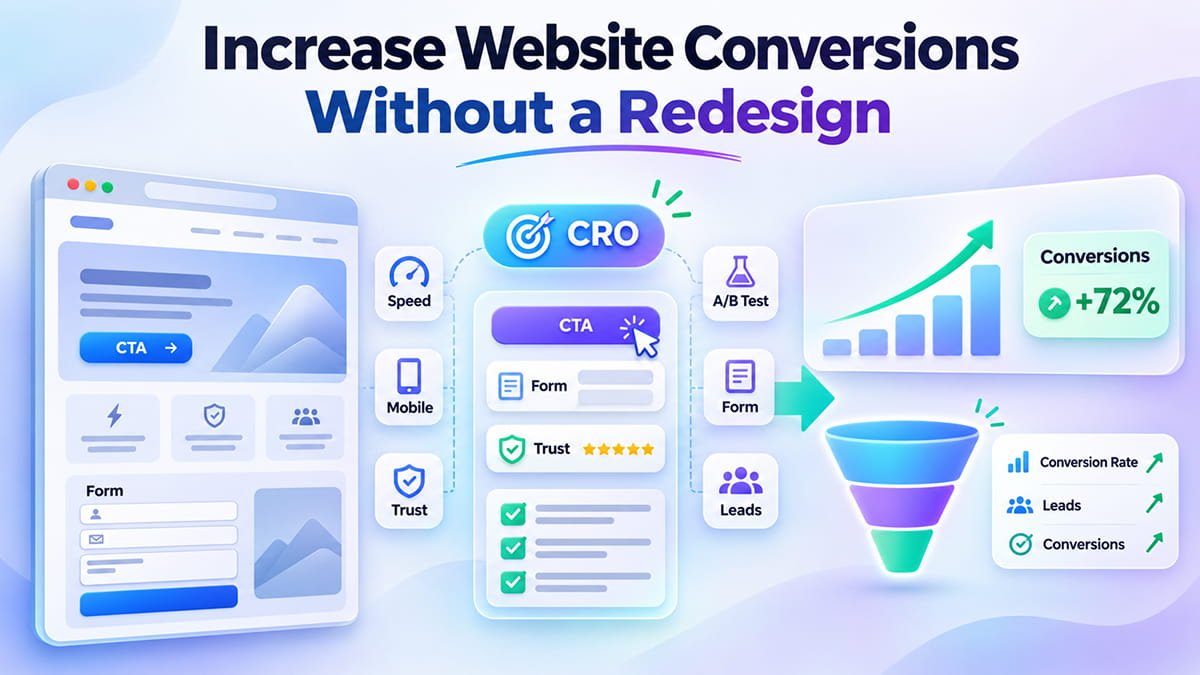
This process is called Conversion Rate Optimization (CRO). Instead of rebuilding your website or spending more money attracting visitors, CRO focuses on helping existing visitors complete valuable actions.
In this guide, we’ll explore 12 practical ways to increase website conversions without a redesign, explain how to identify conversion barriers, and show how WordPress and Squarespace website owners can improve performance without starting from scratch.
What Is Website Conversion Rate Optimization (CRO)?
Conversion Rate Optimization (CRO) is the process of improving a website to increase the percentage of visitors who complete a desired action.
A conversion can mean different things depending on your business.
For example:
- Service businesses: Contact form submissions, consultation bookings, or quote requests.
- E-commerce websites: Product purchases or completed checkouts.
- SaaS companies: Free trial registrations, demo bookings, or subscriptions.
- Local businesses: Appointment bookings, phone calls, or qualified inquiries.
- Professional services: Consultation requests, document downloads, or lead generation.
CRO focuses on understanding why visitors don’t convert and improving the elements that influence their decisions.
How Do You Calculate Website Conversion Rate?
The basic website conversion rate formula is:
Conversion Rate = (Conversions ÷ Visitors) × 100
For example, imagine a website receives 5,000 visitors per month and generates 100 inquiries.
Its conversion rate is:
(100 ÷ 5,000) × 100 = 2%
If the same website increases its conversion rate to 3%, it would generate 150 inquiries from the same number of visitors.
That’s 50 additional inquiries without increasing traffic.
These figures are illustrative, not a guaranteed improvement. Your results will depend on traffic quality, audience intent, business model, and the changes you implement.
For accurate reporting, define whether you’re measuring conversions per user or per session and use that definition consistently.
Can You Increase Website Conversions Without Redesigning Your Website?
Yes. You can improve website conversions without a full redesign by optimizing existing content, calls to action, forms, mobile usability, page speed, and trust signals.
A full redesign may be appropriate when a website has severe structural, accessibility, branding, or technical problems.
However, many websites already have a functional foundation.
Their main conversion problems may be smaller and easier to fix:
- Visitors don’t understand the value proposition.
- Important buttons aren’t visible enough.
- Contact forms ask too many questions.
- Mobile navigation is frustrating.
- Pages load slowly.
- Trust signals are missing.
- Service descriptions don’t answer customer questions.
- Analytics doesn’t reveal where visitors abandon the process.
These issues can often be addressed through targeted conversion optimization rather than rebuilding the entire website.
12 Ways to Increase Website Conversions Without a Redesign
1. Improve Your Above-the-Fold Content
The first section visitors see can strongly influence whether they explore your website or leave.
This area is commonly called the above-the-fold section.
Your homepage or landing page should quickly communicate three things:
- What your business offers.
- Who your services are for.
- What visitors should do next.
Avoid generic headlines that sound impressive but don’t explain your services.
Weak headline:
“Innovative Digital Solutions for Modern Businesses”
Stronger headline:
“Custom WordPress Websites That Help Service Businesses Generate More Leads”
The second example explains the service, intended audience, and potential business benefit.
A clear value proposition reduces uncertainty and helps visitors determine whether they’ve found the right business.
Quick CRO improvement: Rewrite your main headline and supporting paragraph before changing the page layout.
2. Make Your Calls to Action Clear and Specific
A call to action (CTA) tells visitors what to do next.
Common examples include:
- Get a Free Quote
- Book a Consultation
- Request a Website Audit
- Schedule a Demo
- Check Availability
- Start Your Free Trial
Generic buttons such as “Submit” or “Learn More” aren’t always the most effective choice.
Specific CTAs can help visitors understand the next step and what they’ll receive.
For example, a digital agency could replace:
Before: “Contact Us”
After: “Request a Free Project Estimate”
The improved CTA communicates a clearer outcome.
However, CTA effectiveness depends on context. “Contact Us” may still be appropriate for a general contact page.
Where Should CTA Buttons Appear?
For longer service pages, consider placing relevant calls to action:
- Near the main headline.
- After the primary service benefits.
- Following testimonials or case studies.
- At the end of the page.
The goal isn’t to fill every section with buttons. It’s to make the next step accessible when visitors are ready.
Quick CRO improvement: Choose one primary CTA per page and make its wording consistent with the intended conversion.
3. Simplify Your Contact Forms
Contact forms are often one of the biggest sources of conversion friction.
A visitor might be interested in your service but abandon the form because it requires too much information.
For example, an initial consultation form may ask for:
- Full name.
- Email address.
- Phone number.
- Company name.
- Project budget.
- Project deadline.
- Business address.
- Detailed project description.
Not every field is necessary during the first interaction.
For many service businesses, a shorter form could include:
Name
How can we help?
Additional information can be collected after the initial inquiry.
Reducing unnecessary fields can make the process feel easier and more approachable.
Other practical improvements include:
- Use clear, visible field labels.
- Enable appropriate autocomplete.
- Show understandable validation messages.
- Make optional fields clearly identifiable.
- Confirm that the form was submitted successfully.
- Test the form on mobile devices.
Quick CRO improvement: Review every form field and ask whether it’s essential before the first conversation.
Don’t automatically remove fields that are genuinely required to qualify leads, provide quotes, or comply with regulations.
4. Improve Website Loading Speed
Website performance influences how smoothly users interact with your content.
Slow pages can interrupt the browsing experience and create frustration, especially on mobile devices.
Google measures important aspects of real-world page experience using Core Web Vitals.
The three main metrics are:
| Metric | What It Measures | Good Performance |
|---|---|---|
| Largest Contentful Paint (LCP) | Main content loading | ≤ 2.5 seconds |
| Interaction to Next Paint (INP) | Responsiveness to interactions | ≤ 200 milliseconds |
| Cumulative Layout Shift (CLS) | Visual stability | ≤ 0.1 |
These are Google’s recommended good-performance thresholds, evaluated using real-user data at the 75th percentile.
Improving Core Web Vitals can make a website more pleasant and reliable to use, although faster loading doesn’t guarantee a specific conversion increase.
How to Improve Website Speed Without a Redesign
Start with existing technical issues:
- Compress oversized images using modern formats such as WebP or AVIF.
- Avoid lazy-loading important above-the-fold images.
- Enable appropriate page caching.
- Remove unnecessary third-party scripts.
- Reduce excessive JavaScript execution.
- Prevent unexpected layout shifts.
- Optimize hosting and server response times.
WordPress websites may benefit from properly configured caching and image optimization tools.
Squarespace website owners can focus on image sizes, third-party embeds, custom scripts, and unnecessary external integrations.
Quick CRO improvement: Test your most important landing pages with Google PageSpeed Insights and prioritize problems that affect real users.
5. Optimize Your Website for Mobile Conversions
A responsive layout doesn’t automatically mean a website is easy to use on mobile devices.
A website may technically fit a smartphone screen while still creating conversion problems.
Examples include:
- Buttons that are difficult to tap.
- Text that requires zooming.
- Large images pushing important content down.
- Complicated navigation menus.
- Forms that are frustrating to complete.
- Sticky elements covering important buttons.
Mobile optimization should focus on making essential actions convenient.
For example, a local service company might benefit from a clearly visible “Call Now” button.
An appointment-based business might prioritize a simple booking link.
An e-commerce store should make it easy to review cart contents and complete checkout.
Quick CRO improvement: Open your website on an actual smartphone and try completing its main conversion action from beginning to end.
Pay particular attention to how the experience differs from desktop.
6. Add Trust Signals Near Important Decisions
Visitors are more likely to contact a business when they understand who they’re dealing with and why they should trust it.
Trust signals can help reduce uncertainty.
Useful examples include:
- Authentic customer testimonials.
- Relevant case studies.
- Verified customer reviews.
- Professional certifications.
- Real client or project examples.
- Clear contact information.
- Transparent service details.
- Secure payment options when applicable.
For example, a website development agency could include a short testimonial and a link to a relevant case study near its consultation CTA.
A dental clinic might introduce its medical team, qualifications, and real treatment process before presenting an appointment form.
Avoid fabricated reviews, misleading statistics, and unsupported claims.
Quick CRO improvement: Add one relevant, credible proof point near your primary conversion section.
7. Make Your Service Descriptions Benefit-Focused
Many websites describe what they do without explaining why customers should care.
Consider this example:
Feature-focused copy:
“We develop custom WordPress websites using Elementor and advanced plugins.”
Benefit-focused copy:
“We build fast, easy-to-manage WordPress websites that help businesses present their services clearly and turn more visitors into qualified leads.”
The second version connects the technical service to an understandable business objective.
Effective service descriptions should answer:
- What problem does this service solve?
- Who is it designed for?
- What does the customer receive?
- How does the process work?
- What makes this provider a suitable choice?
You don’t need to eliminate technical details.
Instead, explain how those features benefit the customer.
Quick CRO improvement: Rewrite the opening paragraphs of your three most important service pages around customer problems and outcomes.
8. Reduce Distractions and Unnecessary Choices
Not every conversion problem requires adding more information.
Sometimes the issue is that a page offers too many competing actions.
For example, a landing page might contain:
- Multiple promotional banners.
- Several unrelated CTA buttons.
- Automatic pop-ups.
- A complicated navigation menu.
- Numerous external links.
- Distracting animations.
These elements can make it harder for visitors to identify the next logical step.
A focused page should support one primary conversion objective while still allowing users to access the information they need.
For a consultation landing page, that objective might be booking a call.
For a product page, it might be adding an item to the cart.
Quick CRO improvement: Review your highest-priority landing page and remove, reposition, or simplify elements that compete with the primary action.
9. Improve Your Website Navigation and Internal Links
Visitors need to find relevant information before they can make a decision.
Confusing navigation can cause users to abandon a website, even when the business offers exactly what they need.
Your navigation should reflect how customers think about your services.
For example, a website development agency might organize its main menu around:
- WordPress Development
- Squarespace Development
- SEO Services
- Portfolio
- About
- Contact
Clear labels are generally easier to understand than vague or overly creative navigation terms.
Internal links also help visitors move between related content.
A blog post about website performance could link to a relevant technical SEO service page.
A case study could link to the service used in that project.
Quick CRO improvement: Add contextual internal links from high-traffic informational pages to relevant commercial pages.
This can help visitors progress naturally from research to inquiry.
10. Optimize Pricing and Service Transparency
Uncertainty about pricing, deliverables, and service processes can discourage potential customers.
You don’t necessarily need to publish fixed prices for every service.
However, visitors should understand what to expect.
Depending on the business, useful information may include:
- Starting prices or price ranges.
- What is included in the service.
- Typical project stages.
- Payment structure.
- Delivery considerations.
- Revision policies.
- What happens after submitting an inquiry.
For example, a custom website development company could describe the factors that influence pricing, such as page count, functionality, integrations, and design complexity.
For e-commerce businesses, pricing clarity is particularly important during checkout.
Baymard Institute’s checkout usability research identifies unexpected additional costs and forced account creation as significant sources of checkout abandonment.
Quick CRO improvement: Reduce avoidable pricing uncertainty and explain the next steps before asking visitors to commit.
11. Use Heatmaps and Session Recordings to Find Conversion Barriers
Instead of guessing why visitors don’t convert, analyze how they actually interact with your website.
Behavior analytics tools can reveal patterns that traditional traffic reports don’t always explain.
For example, Microsoft Clarity provides features such as:
- Heatmaps.
- Session recordings.
- Scroll behavior analysis.
- Click interaction analysis.
- Behavioral insights.
These tools can help identify situations where visitors repeatedly click elements that aren’t interactive, struggle with navigation, or abandon key pages.
For example, you may discover that many mobile users never reach the contact form because it appears too far down the page.
Or visitors may repeatedly click an image expecting it to open a product detail page.
These observations can guide targeted improvements.
Make sure analytics and session recording implementations comply with applicable privacy requirements, including consent and masking of sensitive information.
Quick CRO improvement: Review behavior on your three most important conversion pages before changing their layouts.
12. Run A/B Tests Instead of Making Random Changes
A/B testing allows you to compare two versions of a website element and measure how they perform.
For example:
Version A: “Contact Us”
Version B: “Get a Free Quote”
Both versions are shown to comparable groups of visitors, and their performance is measured against a defined conversion goal.
You can test:
- CTA wording.
- Button placement.
- Headlines.
- Form length.
- Supporting copy.
- Trust signal placement.
- Pricing presentation.
However, A/B testing requires sufficient traffic and an appropriate experiment design.
Small sample sizes can produce misleading results.
For websites with limited traffic, qualitative research, usability testing, and carefully monitored changes may be more practical than running underpowered experiments.
Quick CRO improvement: Test one meaningful hypothesis at a time and measure its impact on completed conversions—not just button clicks.
Which Website Changes Should You Prioritize First?
Not every CRO improvement deserves the same priority.
The best starting point is usually the issue that creates the most friction for visitors closest to converting.
Use this prioritization table as a practical guide.
| Website Problem | Recommended Improvement | Primary Metric |
|---|---|---|
| Low CTA engagement | Improve copy and visibility | CTA click rate |
| High form abandonment | Simplify form and fix errors | Form completion rate |
| Slow mobile pages | Optimize loading and responsiveness | Core Web Vitals |
| Low service-page conversion | Clarify benefits and add proof | Qualified lead rate |
| High checkout abandonment | Improve checkout clarity | Checkout completion rate |
| Confusing user journeys | Simplify navigation | Funnel completion rate |
| Poor lead quality | Improve qualification messaging | Qualified leads per session |
These are starting points, not guaranteed outcomes.
Prioritization should be based on analytics, user research, potential business impact, and implementation effort.
How to Measure Website Conversion Improvements
Before optimizing a website, you need a reliable measurement system.
Otherwise, you may improve the appearance of a page without knowing whether the changes generate business results.
Define Your Primary Conversion
Choose the action that matters most to your business.
For example:
- A submitted consultation form.
- A confirmed appointment.
- A completed purchase.
- A qualified demo request.
Avoid treating every interaction as an equally valuable conversion.
Track Key Events With Google Analytics 4
Google Analytics 4 (GA4) allows businesses to measure important website interactions and designate relevant events as key events.
For a service website, this might include successful form submissions or consultation bookings.
For an online store, the primary measurement may be completed purchases.
Make sure events fire only when the intended action actually succeeds.
For example, clicking a form’s submit button is not the same as successfully submitting the form.
Segment Your Data
Analyze performance separately for:
- Mobile and desktop visitors.
- Organic and paid traffic.
- New and returning visitors.
- Landing pages.
- Relevant geographic markets.
A website may convert well on desktop while performing poorly on mobile.
Without segmentation, that problem could remain hidden.
Monitor Business Outcomes
A higher conversion rate is useful only if it contributes to meaningful business results.
For example, increasing form submissions while reducing lead quality may not improve revenue.
Consider tracking qualified leads, booked calls, completed sales, and other outcomes that reflect actual business value.
Example: How Small Improvements Can Increase Website Leads
Consider a service business with the following monthly website performance:
| Metric | Before Optimization | After Optimization |
|---|---|---|
| Monthly visitors | 4,000 | 4,000 |
| Conversion rate | 1.5% | 2.25% |
| Monthly inquiries | 60 | 90 |
| Additional inquiries | — | +30 |
This hypothetical scenario demonstrates a 50% increase in inquiries without increasing traffic.
The business might achieve improvement through a combination of clearer calls to action, more relevant service content, easier forms, and improved mobile usability.
However, the actual impact of individual CRO changes varies considerably.
The purpose of conversion optimization is to identify improvements, test them, and measure their business impact.
Conversion Optimization for WordPress Websites
WordPress provides flexibility for implementing CRO improvements without rebuilding a website.
Depending on the theme and page builder, you can optimize existing pages using Elementor, Bricks, Gutenberg, or other supported tools.
Potential improvements include:
- Updating hero headlines and CTA buttons.
- Improving contact forms.
- Optimizing image delivery and caching.
- Reducing unnecessary scripts and plugins.
- Adding relevant testimonials.
- Improving mobile layouts.
- Setting up GA4 conversion tracking.
- Testing page elements and content variations.
Before adding new optimization plugins, check whether existing tools already provide the required functionality.
Too many plugins and overlapping scripts can introduce performance or tracking problems.
The goal should be a faster, clearer, and more effective user journey—not a more complicated technical setup.
Conversion Optimization for Squarespace Websites
Squarespace websites can also benefit significantly from targeted CRO improvements.
A complete redesign is not always necessary.
With Squarespace 7.1 and Fluid Engine, many existing layouts can be refined while maintaining the current visual identity.
Useful improvements include:
- Adjusting above-the-fold messaging.
- Repositioning CTA buttons.
- Improving mobile section layouts.
- Simplifying contact and inquiry forms.
- Refining navigation.
- Optimizing image sizes.
- Adding relevant testimonials and case studies.
- Improving conversion tracking.
Custom CSS or JavaScript can support specific improvements where Squarespace’s native features are insufficient.
However, custom code should be used carefully to preserve accessibility, mobile usability, and maintainability.
A good CRO strategy improves the existing website experience rather than adding unnecessary complexity.
A Practical 30-Day Website Conversion Optimization Plan
You don’t need to change everything at once.
A structured 30-day plan helps identify problems, implement improvements, and begin evaluating the results.
Week 1: Audit and Measurement
- Define your primary conversion goals.
- Verify GA4 tracking.
- Review mobile and desktop conversion rates.
- Check Core Web Vitals.
- Analyze important user journeys.
- Identify the pages with the greatest conversion opportunities.
Week 2: Messaging and CTA Improvements
- Improve unclear headlines.
- Rewrite benefit-focused service descriptions.
- Make primary CTAs more specific.
- Add relevant trust signals.
- Review navigation and internal linking.
Week 3: Forms and Technical Optimization
- Simplify unnecessary form fields.
- Fix validation and submission errors.
- Improve mobile usability.
- Address important loading performance issues.
- Verify that conversion tracking works correctly.
Week 4: Evaluation and Testing
- Compare performance with the baseline.
- Review user behavior insights.
- Run an appropriate A/B test where traffic permits.
- Identify additional conversion barriers.
- Create a prioritized optimization backlog.
Thirty days is enough to complete an initial optimization cycle, but not necessarily enough to determine statistically reliable results for every website.
Continuous measurement and refinement are essential.
SEO vs. CRO: Why Your Website Needs Both
Search Engine Optimization (SEO) and Conversion Rate Optimization (CRO) serve different but complementary purposes.
SEO helps attract relevant visitors. CRO helps more of those visitors complete valuable actions.
A website can rank well on Google but perform poorly as a lead generation tool.
Likewise, a highly optimized landing page won’t generate much organic business if potential customers cannot find it.
The most effective website strategies consider both.
| SEO | CRO |
|---|---|
| Improves organic search visibility | Improves conversion performance |
| Targets search intent | Addresses user decision-making |
| Optimizes content and site structure | Optimizes user journeys and forms |
| Supports relevant organic traffic | Supports leads, bookings, and sales |
| Measures impressions and organic clicks | Measures conversion rates and business outcomes |
Some improvements benefit both disciplines.
For example, clearer page content can help users understand a service and make the page more relevant to appropriate search queries.
Better loading performance supports user experience and aligns with Google’s page experience recommendations.
However, SEO and CRO metrics should be evaluated independently rather than assuming that improving one automatically improves the other.
How Conversion-Focused Content Supports AI Search Optimization
As AI-powered search experiences continue to evolve, websites need content that explains their value clearly and answers user questions directly.
AI Search Optimization does not replace traditional SEO or CRO.
Instead, these disciplines work together at different stages of the customer journey.
AI-assisted search may help users discover a business or understand its services.
Once those visitors reach the website, the page still needs to communicate value, build trust, and provide a clear next step.
Use Clear, Answer-Focused Headings
Organize content around genuine customer questions.
Examples include:
- How much does a WordPress website cost?
- How long does website development take?
- Can an existing Squarespace website be optimized?
- What is included in a technical SEO audit?
Provide direct, accurate answers followed by useful explanations.
Explain Your Services and Process Clearly
Describe what you offer, who it’s for, what customers receive, and what happens next.
Avoid vague marketing language that provides little useful information.
Demonstrate Real Expertise
Publish genuine case studies, verified testimonials, practical examples, and accurate descriptions of your work.
Do not fabricate success metrics or present hypothetical improvements as actual customer results.
Make Information Easy to Navigate
Use descriptive headings, logical internal links, accessible page elements, and appropriate structured data.
There is no special Schema markup that guarantees citations or visibility in AI-generated answers.
A clear, accessible, well-organized website supports both human visitors and search systems.
Final Thoughts: You Don’t Need a New Website to Get Better Results
A complete website redesign can be a significant investment.
But if your current website is technically sound and generally aligned with your business goals, targeted conversion optimization may be a more practical first step.
Start by identifying where visitors struggle.
Improve your headlines, make CTAs clearer, simplify forms, strengthen trust signals, and address mobile usability or performance problems.
Then measure what changes.
The goal isn’t simply to make your website look better. It’s to make your existing website work better for your business.
At Ace Web Agency, we help businesses improve WordPress and Squarespace websites through technical optimization, user experience improvements, SEO, and conversion-focused development.
Whether your website needs faster loading, clearer service pages, better mobile usability, or more effective lead generation, we can help identify and implement improvements without an unnecessary full redesign.
Want to turn more website visitors into customers?
Explore Ace Web Agency’s website optimization and development services and discover how targeted improvements can help your website generate more meaningful results.
Frequently Asked Questions
What is the fastest way to increase website conversions?
Start by improving your primary call to action, simplifying contact forms, and making your value proposition clearer. These are often relatively low-effort changes, although the best starting point depends on where visitors encounter friction.
Can I improve my website conversion rate without redesigning it?
Yes. You can improve conversion rates by updating existing content, optimizing CTA buttons, simplifying forms, improving loading speed, adding trust signals, and refining mobile usability. A complete redesign is not always necessary.
What is a good website conversion rate?
There is no universal conversion rate benchmark. Performance varies depending on industry, traffic source, conversion type, and business model. Compare your website’s results with its historical performance and relevant business goals rather than relying on one industry-wide number.
Does website speed affect conversions?
Website loading speed can influence user experience and create or reduce friction during the conversion process. Improving slow pages may help visitors complete important actions, although conversion gains are not guaranteed.
How can I increase leads from my WordPress website?
Improve your WordPress website’s calls to action, service descriptions, contact forms, mobile experience, and loading speed. Track successful inquiries with GA4 and prioritize changes based on actual user behavior.
How can I improve Squarespace conversions without rebuilding my website?
You can update headlines, reposition CTA buttons, simplify forms, improve mobile Fluid Engine layouts, optimize images, and add credible testimonials without rebuilding the entire Squarespace website.
What is the difference between SEO and CRO?
SEO focuses on attracting relevant traffic through search engines. CRO focuses on increasing the percentage of website visitors who complete valuable actions, such as submitting forms, booking consultations, or making purchases.
How long does conversion rate optimization take?
Some website improvements can be implemented within days, while reliable measurement may require several weeks or longer. The timeline depends on website traffic, technical complexity, and the type of experiment being conducted.
Do I need expensive tools to optimize website conversions?
No. You can begin with tools such as Google Analytics 4, Google Search Console, PageSpeed Insights, and Microsoft Clarity. More advanced testing platforms may be useful as your website traffic and optimization requirements grow.